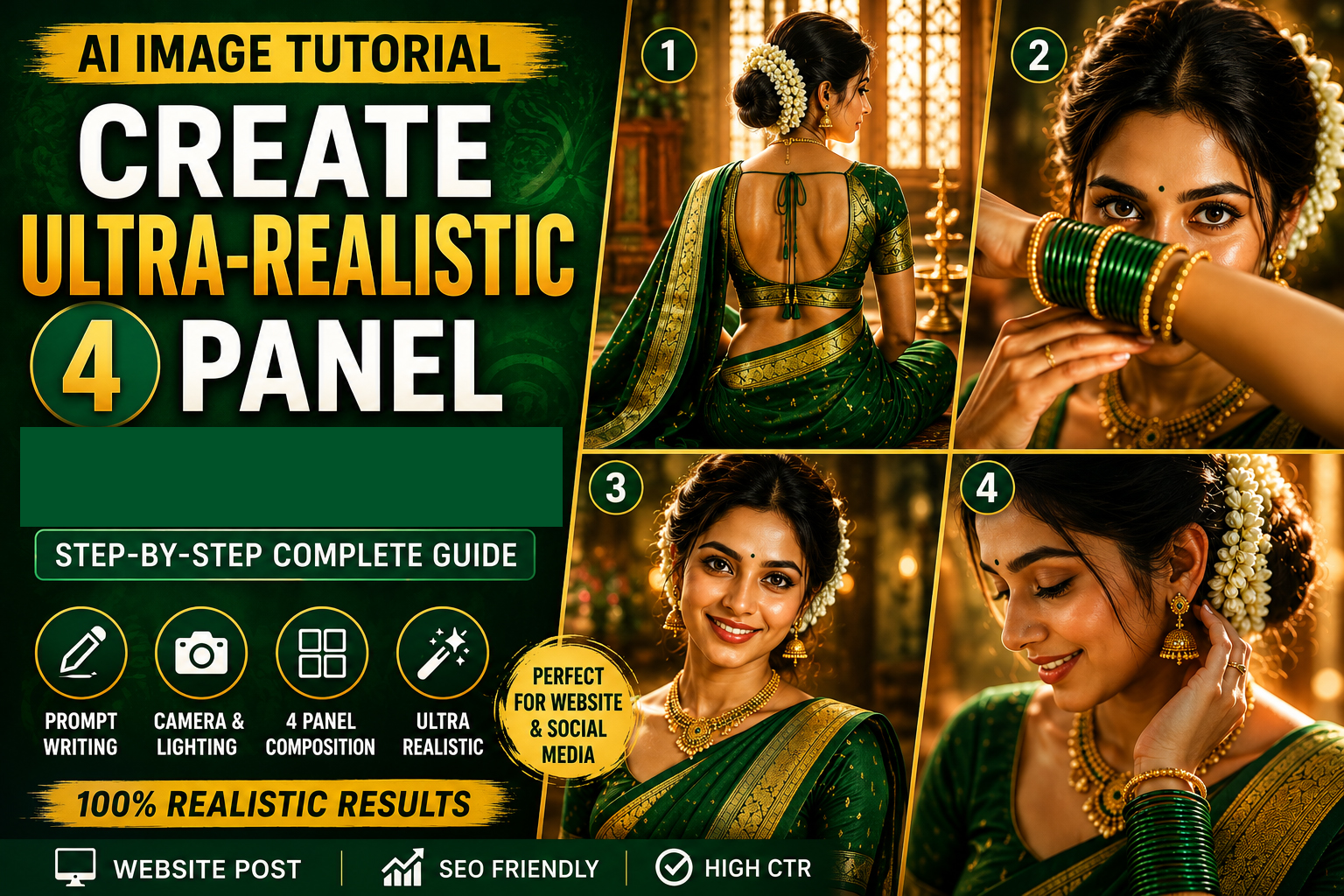
Complete Step-by-Step Guide to Create Ultra-Realistic AI Images in ChatGPT
Creating professional AI images is not just about writing a long prompt. High-quality images are created by arranging the prompt in a logical structure. Below is a complete guide explaining each part of your prompt.
Step 1: Decide the Image Quality
Start by telling the AI the quality you want.
Example:
- Hyper Realistic
- Ultra Realistic
- Photorealistic
- 24K UHD
- DSLR Quality
- Studio Photography
- Professional Camera Shot
- Natural Skin Texture
- Sharp Details
- HDR
- Cinematic Lighting
Example:
Hyper ultra-realistic 24K UHD professional studio photography with natural skin texture, extremely sharp details, realistic color tones.
Step 2: Mention the Subject
Describe who is in the image.
Example
- Beautiful young South Asian woman
- Indian woman
- Nepali woman
- Bride
- Businessman
- Farmer
- Child
- Old Woman
Example
A beautiful young South Asian bride.
Step 3: Describe Face
Explain facial appearance.
Include
- Face shape
- Skin tone
- Eyes
- Lips
- Smile
- Hair
- Makeup
Example
- glowing skin
- expressive eyes
- natural makeup
- kajal
- soft smile
- realistic lips
- detailed eyebrows
- natural eyelashes
Example
Glowing skin, expressive eyes, soft smile, detailed eyebrows, kajal, realistic eyelashes.
Step 4: Describe Hair Style
Example
- Long black hair
- Open hair
- Bun hairstyle
- Braided hair
Example
Hair tied in a traditional bun decorated
Step 5: Describe Clothing
Explain clothing completely.
Include
- Saree
- Dress
- Kurta
- Lehenga
- Suit
- Shirt
Also mention
Color
Material
Border
Embroidery
Example
Emerald green silk saree with rich zari border and matching blouse.
Step 6: Describe Jewellery
Example
- Necklace
- Bangles
- Gold Kadas
- Rings
- Earrings
- Nose Pin
- Maang Tikka
- Waist Belt
Example
Green glass bangles, antique gold jhumkas, layered necklace, gold kadas.
Step 7: Makeup Details
Example
- Tiny black bindi
- Kajal
- Matte lipstick
- Natural blush
- Bridal makeup
Step 8: Pose
Tell AI exactly how the person is standing.
Examples
Standing
Walking
Sitting
Looking back
Looking sideways
Folded hands
Hands near face
Crossed arms
Close-up
Eye Contact
Example
Back-facing seated pose showing blouse back design.
Step 9: Camera Angle
Choose camera view.
Examples
Eye Level
Low Angle
High Angle
Top View
Over Shoulder
Side View
Front View
Closeup
Medium Shot
Wide Shot
Example
Side close-up portrait.
Step 10: Camera Lens
This greatly affects image quality.
Examples
35mm
50mm
85mm
105mm
135mm
Macro Lens
Portrait Lens
Example
Shot with an 85mm portrait lens.
Step 11: Aperture
Controls background blur.
Examples
f/1.2
f/1.4
f/1.8
f/2.8
Example
f/1.4 shallow depth of field.
Step 12: Lighting
One of the most important parts.
Examples
Golden Hour
Window Light
Soft Studio Light
Rim Light
Volumetric Rays
Sunset Light
Cinematic Lighting
Warm Glow
Diffused Lighting
Example
Warm golden window light with cinematic glow.
Step 13: Background
Describe surroundings.
Examples
Temple
Garden
Royal Palace
Studio
Blurred Background
Luxury Room
Traditional House
Example
Soft luxury indoor background with creamy bokeh.
Step 14: Atmosphere
Creates mood.
Examples
Dreamy
Luxury
Elegant
Royal
Romantic
Spiritual
Peaceful
Warm
Example
Dreamy atmosphere with floating dust particles.
Step 15: Special Effects
Optional
Examples
Floating dust
Fog
Mist
Rain
Snow
Petals
Smoke
Sparkles
Light Rays
Step 16: Photography Style
Tell AI what type of photography.
Examples
Editorial
Fashion
Magazine Cover
Wedding Photography
Lifestyle Photography
Fine Art Photography
Luxury Photography
Portrait Photography
Studio Photography
Example
Luxury editorial wedding photography.
Step 17: Color Tone
Examples
Warm Amber
Golden
Natural
Earth Tone
Pastel
Vintage
Soft Color Grade
Example
Rich amber cinematic color grading.
Step 18: Rendering Style
Examples
HDR
Ultra Sharp
Natural Texture
8K
16K
24K
Noise Free
Photorealistic
Extreme Detail
Step 19: Multi-Panel Layout
If making a collage, explain every panel separately.
Example
Panel 1
Back-facing seated pose showing blouse back design.
Panel 2
Close-up portrait with expressive eyes visible through green bangles.
Panel 3
Front-facing smiling portrait.
Panel 4
Side close-up highlighting jasmine gajra, earrings and bangles.
Step 20: Aspect Ratio
Always specify.
Examples
1:1
3:4
4:5
9:16
16:9
2:3
Example
Vertical 3:4 ratio.
Step 21: Negative Prompt (Very Important)
Mention what should NOT appear in the image.
Examples
No blur
No extra fingers
No extra hands
No deformed face
No duplicate jewelry
No low resolution
No cartoon style
No watermark
No logo
No text
No distorted anatomy
No unrealistic skin
No overexposed lighting
No oversaturated colors
Complete Prompt Formula
A high-quality AI image prompt generally follows this structure:
Image Quality → Subject → Face → Hair → Clothing → Jewelry → Makeup → Pose → Camera Angle → Camera Lens → Lighting → Background → Atmosphere → Photography Style → Color Grading → Rendering Quality → Panel Descriptions (if needed) → Aspect Ratio → Negative Prompt
Following this order makes prompts easier for the AI to interpret and helps produce more consistent, high-quality images. Different image-generation models may respond slightly differently, but this structure is a strong foundation for creating detailed, professional-looking results.
Complete Prompt
Create image 100% face accuracy very Hyper ultra-realistic 24K UHD natural skin sharp detail texture colour tone professional photography took by camera studio quality photo A ultrarealistic cinematic 4 pamel Nepali portrait collage of a beautifal young South Asian Nepali woman in an emerald-greensilk saree with rich solid zari border and matching blouse. Traditional styling with green glass bangles Gold kadas, antique jhumkas, Necklace, tiny black bindi.
Panel 1: back facing seated pose
showing extra long bride and
blouse back design.
Panel 2: closeup with expressive
eyes visible between raised hands
covered in green bangles.
Panel3: Front facing smiling portrait with bride visible..
Panel4: side closeup chigh lighting gajra, jhumkas and bangles. Warm Solden window Iight, diematicglow, dreamy haze, volumetric rays, floating dust particles, rich ambertones, creamy bokeh, shallow depth of field, realistic texture luxury editorfial photographs mDR, SR, SSmm, L/i4. vertica1 3:4 ratio.